The agenda for grade 6 and up
Own your week.
Homework, practice, chores and plans in one agenda that’s actually yours. See what matters today, tick it off, and get a heads-up on your phone before anything sneaks up on you.
The demo runs in your browser with a sample family. Nothing leaves it.
For you
Today first. Then the week.
Open Agenda CrewPlanPairPlan & PlayReminder RallyKid Agenda and the most important thing is at the top, then a short list for today, then a quick look at what’s coming. No points, no streaks, no pressure: just your stuff, in order.
The one that matters
Your top priority sits at the top, so you always know where to start.
A list you can finish
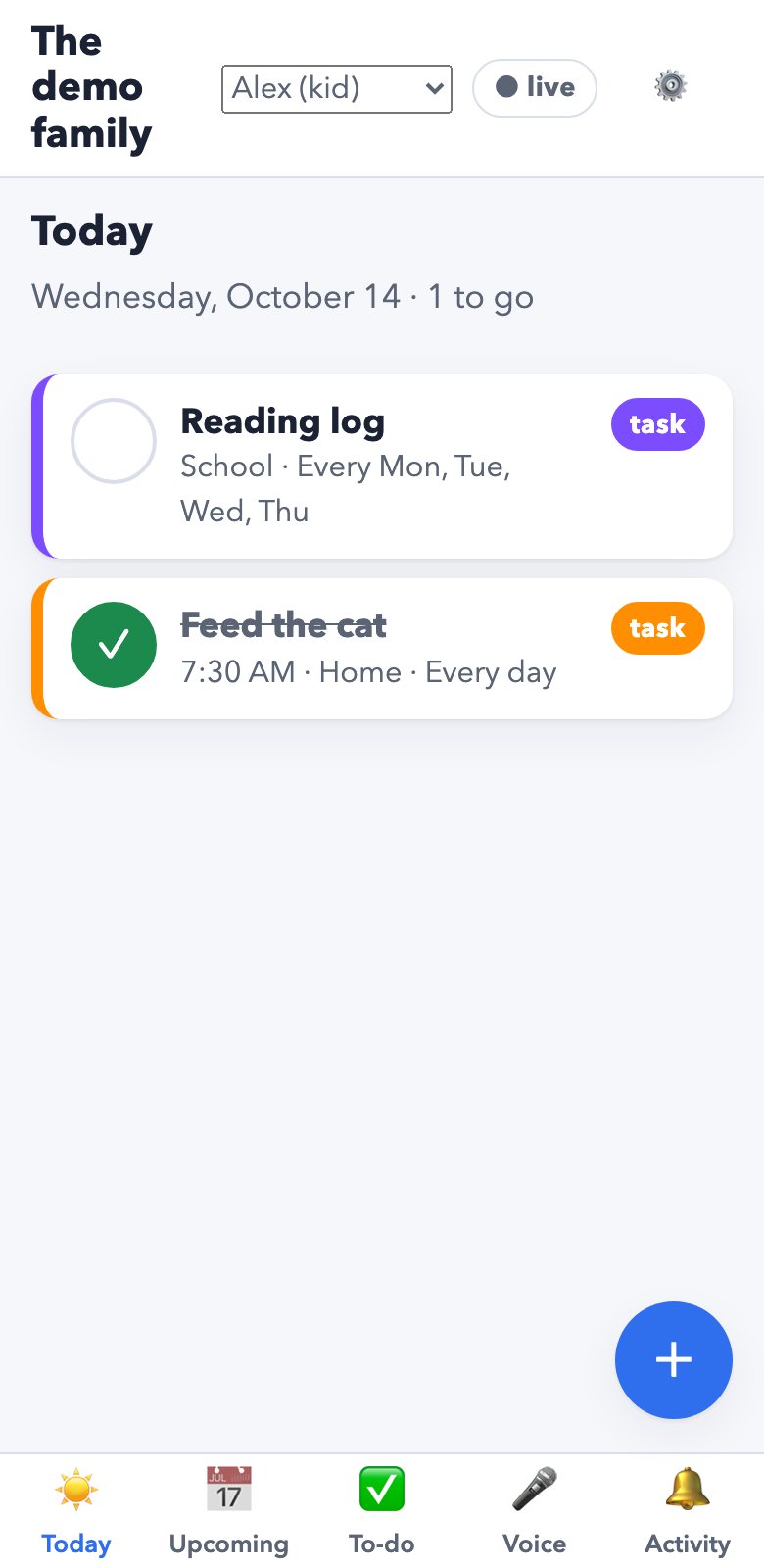
Today’s to-dos with their times and deadlines. Tick them off as you go.
The week at a glance
Tests, practice and plans for the next seven days, marked school, home or activities.
Your week, two ways
Which would you open? We’re exploring both: the same week as a list and as a grid.
A list, day by day
Everything in order, with times, repeats and reminders. Easy to scan on the bus.
A grid, like a calendar
The shape of the week at a look: busy days, free afternoons.
Just say it.
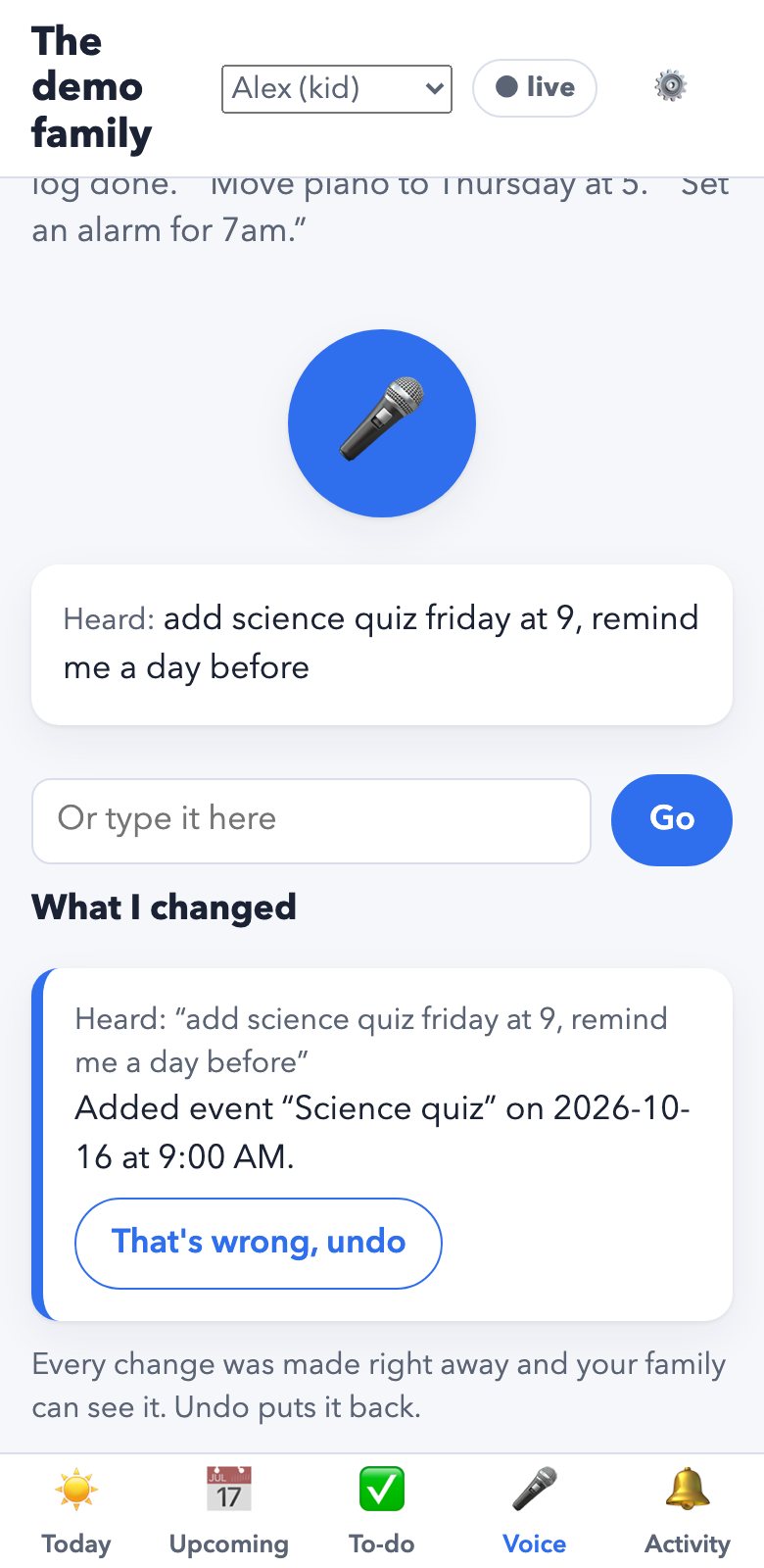
“Add science poster Thursday, remind me a day before.” It’s on your agenda, with an undo if it heard you wrong.
Adding, moving, ticking off and removing things by voice already work. Asking it questions back is an idea we’re exploring.
Already in the app
Real screens from today’s demo: the day’s list, and a voice request with its undo. Simpler than the concepts above, and working.
For parents
Be their backup.
Agenda CrewPlanPairPlan & PlayReminder RallyKid Agenda is your kid’s agenda. You help build it, see how the week is going, and notice early when a hand would help, without hovering.
Build it together
Add classes, practices and chores from a laptop or phone, with reminders and repeats. Plans change? Edit anything; your kid sees it at once.
See how it’s going
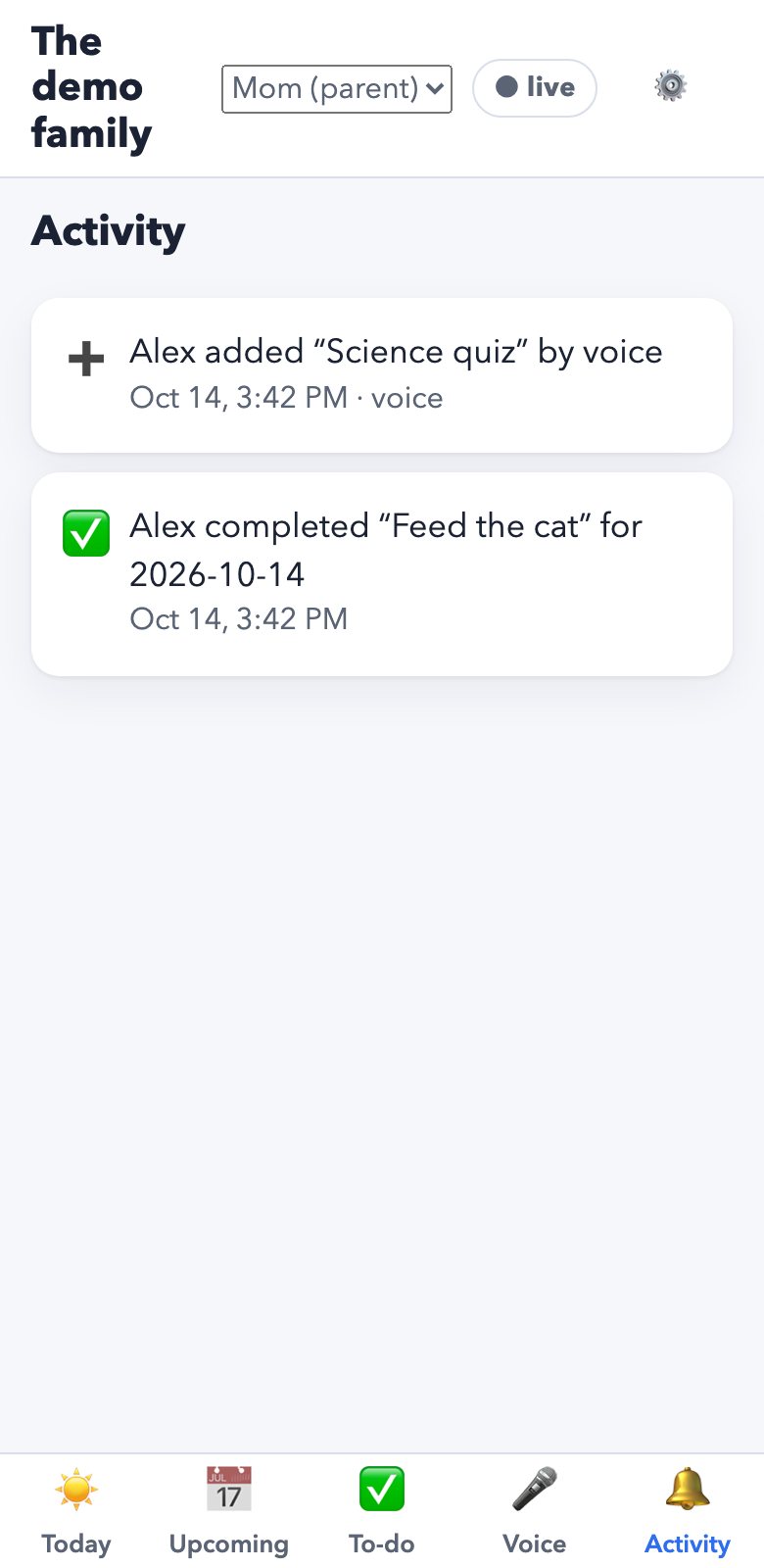
What’s done, what’s still open and what’s coming up. Today the agenda shows every tick and Activity lists every change; a week overview is a concept.
Spot when help is neededConcept
A task that slipped or a crowded week stands out, so you can offer help early instead of finding out late.
A partner, not a monitor
It shares the agenda and nothing else: no location, no messages, no screen time. Your kid sees your changes too.
What works today
Everything below is in the app now, in the demo and on staging.
Reminders that reach the phone
Up to five per item, from the moment it starts to a week before. They can mirror to a paired Apple Watch.
Repeats that keep up
Daily, weekly on the days you pick, or monthly, with an end date if you want one.
Voice, with an undo
Add, move, tick off or remove by voice. You see what it heard and what changed; one tap puts it back.
Live for everyone
A change on one device shows on the others right away, with who made it.
Private by design
Only invited family members see the agenda. Invites are codes, never emails; lock-screen alerts say who changed something, not what.
iPhone, Android, laptop
One agenda, kept in step everywhere it’s open.
Ready to own your week?
Try it with a sample family: switch between the kid and the parent, add things, tick them off, say them.
The demo runs in your browser with a sample family. Nothing leaves it.
7:30 AMWake up
The agenda for grade 6 and up
Own your week.
Homework, practice, chores and plans in one agenda that’s actually yours. See what matters today, tick it off, and get a heads-up on your phone before anything sneaks up on you.
The demo runs in your browser with a sample family. Nothing leaves it.
8:05 AMBefore the bus
For you
Today first. Then the week.
Open Agenda CrewPlanPairPlan & PlayReminder RallyKid Agenda and the most important thing is at the top, then a short list for today, then a quick look at what’s coming. No points, no streaks, no pressure: just your stuff, in order.
The one that matters
Your top priority sits at the top, so you always know where to start.
A list you can finish
Today’s to-dos with their times and deadlines. Tick them off as you go.
The week at a glance
Tests, practice and plans for the next seven days, marked school, home or activities.
3:40 PMAfter school
Your week, two ways
Which would you open? We’re exploring both: the same week as a list and as a grid.
A list, day by day
Everything in order, with times, repeats and reminders. Easy to scan on the bus.
A grid, like a calendar
The shape of the week at a look: busy days, free afternoons.
5:15 PMWay to practice
Just say it.
“Add science poster Thursday, remind me a day before.” It’s on your agenda, with an undo if it heard you wrong.
Adding, moving, ticking off and removing things by voice already work. Asking it questions back is an idea we’re exploring.
Already in the app
Real screens from today’s demo: the day’s list, and a voice request with its undo. Simpler than the concepts above, and working.
7:30 PMFamily check-in
For parents
Be their backup.
Agenda CrewPlanPairPlan & PlayReminder RallyKid Agenda is your kid’s agenda. You help build it, see how the week is going, and notice early when a hand would help, without hovering.
Build it together
Add classes, practices and chores from a laptop or phone, with reminders and repeats. Plans change? Edit anything; your kid sees it at once.
See how it’s going
What’s done, what’s still open and what’s coming up. Today the agenda shows every tick and Activity lists every change; a week overview is a concept.
Spot when help is neededConcept
A task that slipped or a crowded week stands out, so you can offer help early instead of finding out late.
A partner, not a monitor
It shares the agenda and nothing else: no location, no messages, no screen time. Your kid sees your changes too.
8:45 PMWind down
What works today
Everything below is in the app now, in the demo and on staging.
Reminders that reach the phone
Up to five per item, from the moment it starts to a week before. They can mirror to a paired Apple Watch.
Repeats that keep up
Daily, weekly on the days you pick, or monthly, with an end date if you want one.
Voice, with an undo
Add, move, tick off or remove by voice. You see what it heard and what changed; one tap puts it back.
Live for everyone
A change on one device shows on the others right away, with who made it.
Private by design
Only invited family members see the agenda. Invites are codes, never emails; lock-screen alerts say who changed something, not what.
iPhone, Android, laptop
One agenda, kept in step everywhere it’s open.
9:30 PMLights out
Ready to own your week?
Try it with a sample family: switch between the kid and the parent, add things, tick them off, say them.
The demo runs in your browser with a sample family. Nothing leaves it.
The agenda for grade 6 and up
Own your week.
Homework, practice, chores and plans in one agenda that’s actually yours. See what matters today, tick it off, and get a heads-up on your phone before anything sneaks up on you.
The demo runs in your browser with a sample family. Nothing leaves it.
For you
Today first. Then the week.
Open Agenda CrewPlanPairPlan & PlayReminder RallyKid Agenda and the most important thing is at the top, then a short list for today, then a quick look at what’s coming. No points, no streaks, no pressure: just your stuff, in order.
The one that matters
Your top priority sits at the top, so you always know where to start.
A list you can finish
Today’s to-dos with their times and deadlines. Tick them off as you go.
The week at a glance
Tests, practice and plans for the next seven days, marked school, home or activities.
No streaks. No points. No pressure.
Ticking things off should feel good, not like a game you can lose.Your week, two ways
Which would you open? We’re exploring both: the same week as a list and as a grid.
A list, day by day
Everything in order, with times, repeats and reminders. Easy to scan on the bus.
A grid, like a calendar
The shape of the week at a look: busy days, free afternoons.
Just say it.
“Add science poster Thursday, remind me a day before.” It’s on your agenda, with an undo if it heard you wrong.
Adding, moving, ticking off and removing things by voice already work. Asking it questions back is an idea we’re exploring.
Already in the app
Real screens from today’s demo: the day’s list, and a voice request with its undo. Simpler than the concepts above, and working.
For parents
Be their backup.
Agenda CrewPlanPairPlan & PlayReminder RallyKid Agenda is your kid’s agenda. You help build it, see how the week is going, and notice early when a hand would help, without hovering.
Build it together
Add classes, practices and chores from a laptop or phone, with reminders and repeats. Plans change? Edit anything; your kid sees it at once.
See how it’s going
What’s done, what’s still open and what’s coming up. Today the agenda shows every tick and Activity lists every change; a week overview is a concept.
Spot when help is neededConcept
A task that slipped or a crowded week stands out, so you can offer help early instead of finding out late.
A partner, not a monitor
It shares the agenda and nothing else: no location, no messages, no screen time. Your kid sees your changes too.
What works today
Everything below is in the app now, in the demo and on staging.
Reminders that reach the phone
Up to five per item, from the moment it starts to a week before. They can mirror to a paired Apple Watch.
Repeats that keep up
Daily, weekly on the days you pick, or monthly, with an end date if you want one.
Voice, with an undo
Add, move, tick off or remove by voice. You see what it heard and what changed; one tap puts it back.
Live for everyone
A change on one device shows on the others right away, with who made it.
Private by design
Only invited family members see the agenda. Invites are codes, never emails; lock-screen alerts say who changed something, not what.
iPhone, Android, laptop
One agenda, kept in step everywhere it’s open.
Ready to own your week?
Try it with a sample family: switch between the kid and the parent, add things, tick them off, say them.
The demo runs in your browser with a sample family. Nothing leaves it.